Tech Newsroom
💾 What is a NAS Device? Complete Guide for 2026
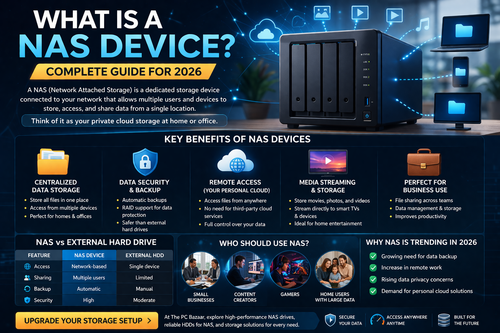
💾 What is a NAS Device? Complete Guide for 2026 🚀 Why NAS Storage is Becoming Essential for Homes & Businesses In today’s data-driven world, managing files securely and efficiently is more important than ever. A NAS (Network Attached Storage) device is one of the best solutions for centralized storage, backup, and file sharing. 🔍 What is a NAS Device? A NAS (Network Attached Storage) is a dedicated storage device connected to your network that allows multiple users and devices to store, access, and share data from a single location. 👉 Think of it as your private cloud storage at home or office ⚡ Key Benefits of NAS Devices 📁 1. Centralized Data Storage Store all files in one place Access from multiple devices Perfect for homes & offices 🔐 2. Data Security & Backup Automatic backups RAID support for data protection Safer than external hard drives 🌐 3. Remote Access (Your Personal Cloud) Access files from anywhere No need for third-party cloud services Full control over your data 🎬 4. Media Streaming & Storage Store movies, photos, and videos Stream directly to smart TVs & devices Ideal for home entertainment 💼 5. Perfect for Business Use File sharing across teams Data management & storage Improves productivity 🆚 NAS vs External Hard Drive Feature NAS Device External HDD Access Network-based Single device Sharing Multiple users Limited Backup Automatic Manual Security High Moderate 📈 Why NAS is Trending in 2026 Growing need for data backup Increase in remote work Rising data privacy concerns Demand for personal cloud solutions 💡 Who Should Use NAS? Small businesses Content creators Gamers Home users with large data 🛒 Upgrade Your Storage Setup At The PC Bazaar, explore: High-performance NAS drives Reliable HDDs for NAS Storage solutions for every need 👉 Build your own secure and powerful storage system
🔍 What is Edge Computing?
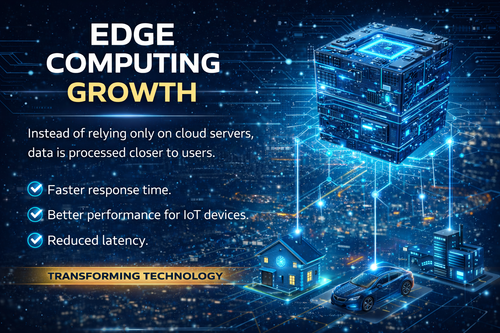
🔍 What is Edge Computing Edge computing is a technology where data is processed near the source (devices or local servers) instead of sending everything to distant cloud data centers. 👉 This results in: Faster performance Real-time processing Improved efficiency ⚡ Key Benefits of Edge Computing ⏱️ 1. Faster Response Time Data is processed locally No delay from sending data to cloud Ideal for real-time applications 📡 2. Better Performance for IoT Devices Smart devices work more efficiently Reduced network congestion Stable connectivity 🔻 3. Reduced Latency Minimal delay in communication Critical for: Online gaming Smart cities Autonomous systems 🌐 Real-World Applications Smart homes & security systems Industrial automation Healthcare monitoring devices Connected vehicles 📈 Why Edge Computing is Growing Fast Rise of IoT devices Need for real-time data processing Increasing demand for faster user experience 💡 Edge vs Cloud Computing Feature Edge Computing Cloud Computing Speed Very Fast Moderate Latency Low Higher Processing Local Centralized Use Case Real-time apps Data storage 🎯 Final Thoughts Edge computing is transforming how data is processed in 2026. By bringing computing closer to users, it ensures faster, smarter, and more efficient systems.
⚡ Rise of High-Speed NVMe Storage
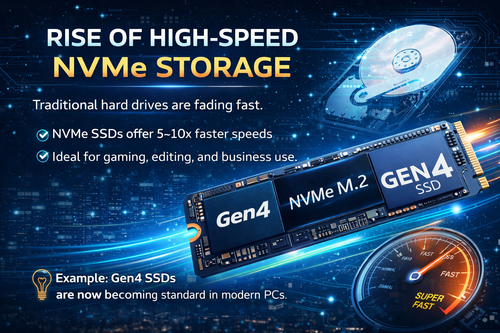
⚡ Rise of High-Speed NVMe Storage 🚀 Why NVMe SSDs Are Replacing Traditional Hard Drives in 2026 In today’s fast-paced digital world, storage technology has evolved rapidly. Traditional hard disk drives (HDDs) are now being replaced by high-speed NVMe SSDs, offering unmatched performance and reliability. 💾 What is NVMe Storage? NVMe (Non-Volatile Memory Express) is a modern storage protocol designed specifically for high-speed solid-state drives (SSDs). Unlike traditional SATA drives, NVMe SSDs connect directly to the motherboard via PCIe, enabling ultra-fast data transfer speeds. ⚡ Key Benefits of NVMe SSDs 🔥 1. Blazing Fast Speed NVMe SSDs are 5–10x faster than SATA SSDs Faster boot times (within seconds) Instant file transfers 🎮 2. Perfect for Gaming & Editing Faster game load times Smooth video editing & rendering No lag during heavy workloads 💼 3. Ideal for Business & Professionals Quick data processing Better multitasking Increased productivity 🔋 4. Better Reliability & Efficiency No moving parts (unlike HDDs) Lower power consumption Longer lifespan 💡 Latest Trend: Gen4 NVMe SSDs The latest PCIe Gen4 NVMe SSDs are now becoming standard in modern PCs. 👉 Benefits: Speeds up to 7000 MB/s Perfect for high-performance systems Future-ready technology 📈 Why You Should Upgrade Now If you are still using a traditional hard drive, upgrading to NVMe SSD can: Boost system speed instantly Improve gaming performance Enhance overall user experience 🛒 Upgrade Your Storage Today At The PC Bazaar, explore a wide range of: High-speed NVMe SSDs Reliable storage solutions Best deals on latest tech 👉 Upgrade now and experience next-level performance
🤖 1. Artificial Intelligence Everywhere
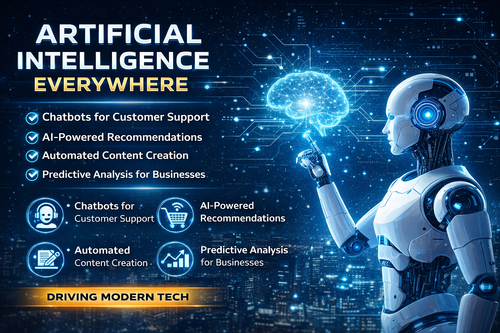
🤖 1. Artificial Intelligence Everywhere Artificial Intelligence (AI) is now deeply integrated into everyday technology, transforming how businesses operate and how people interact with digital systems. 🔍 What’s happening? AI is no longer limited to big tech companies—it’s now accessible to: Small businesses E-commerce platforms Individual users From chatbots to automation tools, AI is becoming a core part of modern IT infrastructure. 💼 How AI is used today 1. Customer Support AutomationAI chatbots can handle customer queries 24/7, reducing response time and improving user experience. 2. Smart Product RecommendationsE-commerce platforms use AI to suggest products based on user behavior, increasing sales. 3. Content CreationAI tools can generate: Product descriptions Blog content Social media posts 4. Predictive AnalysisBusinesses use AI to analyze data and predict: Customer demand Sales trends Inventory needs ⚡ Why AI is important Saves time by automating repetitive tasks Reduces operational costs Improves decision-making with data insights Enhances customer experience 🛒 Impact on IT Hardware Market AI is also increasing demand for: High-speed SSDs More RAM Powerful processors 👉 Because AI applications require fast and efficient systems 🔮 Future of AI In the coming years, AI will become even more powerful with: Voice-based computing AI-powered coding assistants Fully automated business operations 💡 Conclusion Artificial Intelligence is no longer optional—it’s becoming a necessity. Businesses that adopt AI early will gain a strong competitive advantage in the digital world.
How Amazon Prime Subscription Helps You Save Big on Online Shopping
If you enjoy online shopping — especially tech deals on Amazon India — Amazon Prime is one of the smartest investments you can make. From exclusive offers to fast & free delivery, Prime ensures you save money almost every time you click the Buy button. At The PC Bazaar, we focus on helping shoppers get the best value on gadgets and PCs. In this guide, let’s see how Amazon Prime can help you save more while shopping on Amazon and other platforms — plus how you can grab a discounted Prime membership. 🎁 Special Offer — Get Amazon Prime at the Best Price Unlock fast delivery, early access to tech deals, Prime Video, Prime Gaming and more with one membership. Get Amazon Prime Membership Why Smart Shoppers Choose Amazon Prime Prime members get far more than just free delivery. Here’s what you unlock: ⚡ Early access to deals — Grab Lightning Deals and big discounts before non-Prime shoppers. 🚚 Unlimited fast & free delivery on eligible products, often with one-day or two-day shipping. 💸 Extra cashback with Amazon Pay and Prime-exclusive coupons on electronics, fashion, home appliances and more. 🎥 Prime Video & Music for entertainment bundled with the same subscription. 🎮 Prime Gaming for free games and in-game rewards every month. If you make just 2–3 medium or big purchases a year, the savings from delivery charges and exclusive deals can easily recover the entire Prime fee. How Prime Helps Tech Buyers Save More For gadget lovers and PC builders, Amazon Prime can be a game changer. Prime Benefit Why It Matters for Tech Buyers Exclusive tech deals Only Prime members see some of the best prices on laptops, GPUs, monitors and accessories. Early access to Lightning Deals Grab fast-selling gadgets before they go out of stock during big sales. Fast & free delivery Save ₹40–₹150 per order on cables, SSDs, accessories and components. Prime Day mega offers Once-a-year discounts where laptops, GPUs and smart TVs often drop by thousands of rupees. Planning your next upgrade? Explore our tech guides and buying recommendations: Best Laptops & Offers PC Components & Gaming Builds Latest Smartphones & Deals Prime Benefits Beyond Amazon One of the biggest advantages of Prime today is that the value extends beyond regular shopping on Amazon. Depending on current partnerships and promotions, Prime members often get: Discounts on food delivery subscriptions like Swiggy One Lite (at select times). Offers on streaming services and channels through Prime Video. Extra cashback on recharges and bill payments done via Amazon Pay. Free in-game content and rewards in popular titles through Prime Gaming. In short, a single Prime subscription can give you savings on shopping, entertainment, gaming and even everyday bills. Who Should Definitely Get Amazon Prime? You will benefit the most from an Amazon Prime subscription if you are: A regular Amazon shopper who orders multiple times a month. A tech buyer who waits for big sales to upgrade laptops, phones or PC parts. Someone who hates paying delivery charges on small but frequent orders. A student or working professional who wants shopping + entertainment + gaming perks in one plan. Even if you do not shop every week, doing a few big purchases during Prime Day, Great Indian Festival, or other special events can easily make Prime worth it. Amazon Prime Subscription Plans in India Plan Best For Approx. Price Prime Monthly Trying Prime for a short period or around a big sale. ₹299 / month* Prime Quarterly Casual shoppers and seasonal sale buyers. ₹599 / 3 months* Prime Annual Regular Amazon users and tech buyers — best value. ₹1,499 / year* *Prices can change based on Amazon’s latest offers. Always check the current price on the Prime signup page. Ready to Save More on Every Order? Get your Amazon Prime membership today and unlock fast & free delivery, exclusive tech offers and premium entertainment. Activate Prime Membership Now Prime Day, Great Indian Festival & Other Big Sale Events Some of the best tech deals of the year appear during special events like Prime Day, Great Indian Festival and other themed sales on Amazon. Prime members typically get: Exclusive deals that only show up for Prime accounts. Early access to offers before the sale opens for everyone. Extra bank and Amazon Pay cashback on eligible products. If you are planning to buy a new laptop, gaming PC, monitor or smartphone, it often makes sense to activate Prime just before these events and maximise your savings during the sale. Final Verdict — Is Amazon Prime Worth It? If You… Then Prime Is… Shop online regularly on Amazon Almost a must-have subscription. Wait for sale seasons to buy gadgets A great way to get the lowest prices first. Hate paying delivery and convenience charges A simple way to cut those costs all year. Want shopping + entertainment + gaming in one bundle One of the best all-round value subscriptions. For most regular online shoppers, especially tech enthusiasts visiting The PC Bazaar, Amazon Prime is more of an investment in savings than an expense. Don’t Miss the Next Big Sale Activate your Amazon Prime membership now so you’re ready for upcoming tech deals and exclusive offers. Get Prime & Start Saving Today

Can Your PC Run Windows 11? Step-by-Step Upgrade Check & What To Do If It Can't
Can Your PC Run Windows 11? Step-by-Step Upgrade Check & What To Do If It Can't Can Your PC Upgrade to Windows 11? — Step-by-Step Check (Microsoft Guide) Thinking about upgrading to Windows 11? Microsoft published clear minimum requirements — including TPM 2.0, Secure Boot, a supported 64-bit CPU, 4GB RAM and 64GB storage. The easiest, official way to test compatibility is with Microsoft’s PC Health Check app. Below you’ll find a step-by-step checklist, how to run the tools, and what to do if your PC doesn’t qualify. Quick checklist — Windows 11 minimum requirements (short) 64-bit processor (1 GHz or faster with 2+ cores) — supported model list by Microsoft. 4 GB RAM or more. 64 GB storage or more. UEFI firmware with Secure Boot capability. TPM 2.0 (Trusted Platform Module). Graphics: DirectX 12 / WDDM 2.x compatible. For full details and feature-specific requirements consult Microsoft’s official requirements page. Step 1 — Use Microsoft’s PC Health Check (fast & official) Why: This is the official, fastest compatibility check and shows exactly which requirement fails (if any). Download PC Health Check from Microsoft: aka.ms/GetPCHealthCheckApp. Install and open the app. Click Check now. The app will return “This PC can run Windows 11” or explain what needs attention. Step 2 — Check TPM 2.0 (required) TPM 2.0 is a security module Windows 11 uses for features like BitLocker and Windows Hello. Many systems shipped with TPM or have firmware TPM (fTPM) on modern CPUs. Quick checks Method A — TPM MMC: Press Win → type tpm.msc → Enter. If TPM exists you’ll see the TPM Manufacturer and Specification Version (needs to be 2.0). Method B — PowerShell: Open PowerShell as Admin and run Get-Tpm. If TPM is present it returns a Summary including the SpecVersion. If TPM is missing but your motherboard supports it, you may be able to enable TPM/fTPM in UEFI/BIOS (see Step 4). Step 3 — Confirm Secure Boot is enabled Windows 11 requires UEFI firmware and Secure Boot capability (and ideally enabled). To check it quickly: Press Win + R, type msinfo32 and press Enter. In the System Information window look for Secure Boot State. It should say On. If it says Off you may be able to enable it in your UEFI/BIOS settings. Step 4 — If TPM or Secure Boot aren’t enabled — how to turn them on Many modern PCs have TPM and UEFI but they’re disabled by default. Microsoft documents how to enable TPM 2.0 and Secure Boot in firmware (UEFI). Open Settings → Update & Security → Recovery and click Restart now under Advanced startup. Choose Troubleshoot → Advanced options → UEFI Firmware Settings → Restart to enter UEFI/BIOS. In your UEFI settings look for “Security” or “Advanced” → enable TPM / fTPM / “Security Chip”. Find the Secure Boot option and enable it (may require switching from Legacy/CSM to UEFI boot mode). Save and reboot. If unsure, consult your PC or motherboard manual — steps and labels differ across manufacturers. Step 5 — Check CPU, RAM & Storage Microsoft requires a compatible 64-bit CPU, 4GB RAM and 64GB storage minimum. To check quickly: CPU: Open Settings → System → About or run msinfo32 to see your processor model and speed. Then compare to Microsoft’s supported processor lists or the requirements page. If your CPU is old (pre-8th Gen Intel or early Ryzen), it may not be supported./li> RAM: In Settings → System → About check Installed RAM. 4GB is minimum; 8GB+ is recommended. Storage: Ensure at least 64GB free. Use File Explorer or Settings → Storage to check available space. Step 6 — Run Windows Update & make a clean backup Before upgrading, update your current Windows (security & driver updates) and back up important files (OneDrive, external drive, or system image). A clean backup avoids surprises during the upgrade process. Step 7 — If PC Health Check says “This PC can’t run Windows 11” Don’t panic — Microsoft’s report will list which requirement failed. Typical fixes and options: Enable TPM/Secure Boot in UEFI if hardware supports it. Upgrade RAM or swap to an SSD if low on memory or storage. Check CPU support: If the processor is not on Microsoft’s supported list you’ll need a new CPU/motherboard or a newer PC. Enterprise options: Businesses can consider Extended Security Updates or managed rollout plans. See Microsoft documentation for enterprise guidance. Options if your PC can't be upgraded Hardware upgrades — add RAM, replace HDD with SSD, or add TPM module (if your motherboard has a TPM header). Not all laptops allow upgrades. Buy a new Windows 11–compatible PC — recommended if CPU and firmware are not supported. Alternative OS — consider Linux distributions (Ubuntu) or ChromeOS Flex for older devices. Useful commands & quick checks (copy-paste) -- Check TPM: tpm.msc -- PowerShell TPM check: Get-Tpm -- System Information (Secure Boot state & CPU): msinfo32 -- Download PC Health Check: https://aka.ms/GetPCHealthCheckApp Final advice & resources Start with the official PC Health Check app — it shows exactly what’s missing and points you to fixes. If the PC is only missing firmware settings (TPM / Secure Boot) you can often enable them; if the CPU is unsupported, upgrading the machine is the realistic path. For the official requirements and detailed guidance, see Microsoft’s Windows 11 requirements and support pages. Need help running these checks? Drop your PC model (e.g., Dell XPS 13 2020) and We’ll guide you step-by-step on whether it can be upgraded and how.
Microsoft Windows 10 End of Life in 2025: What It Means for Businesses and Users
Windows 10 End of Life in 2025: What It Means for Businesses and Users | The PC Bazaar 🪟 Windows 10 Sunset: What It Means for Businesses and Everyday Users Microsoft has officially announced that Windows 10 support will end on October 14, 2025. After nearly a decade of being one of the most reliable and widely used operating systems, its sunset marks a major turning point for both businesses and consumers. 💡 Why Windows 10 Is Reaching End of Life Launched in 2015, Windows 10 has served as a stable backbone for over a billion PCs worldwide. Microsoft initially committed to a 10-year lifecycle — and now, with the introduction of Windows 11 and upcoming Windows 12, the focus has shifted toward AI-driven, cloud-integrated experiences. This strategic move allows Microsoft to prioritize security, AI productivity, and seamless device integration to keep up with the evolving tech ecosystem. 🕒 What Happens After October 2025? Once support ends, Windows 10 devices will no longer receive security updates or feature patches. Here’s what users and businesses should expect: Category Impact Security No new patches or updates, increasing exposure to cyber threats. Software New applications may stop supporting Windows 10 compatibility. Compliance Businesses may risk non-compliance during IT audits. Hardware Older devices might not meet Windows 11 or 12 requirements. 🏢 How Businesses Should Prepare For organizations, this isn’t just an update — it’s a transformation opportunity. Businesses should start preparing early by: Auditing existing Windows 10 systems and dependencies. Planning phased migration to Windows 11 or Windows 12. Providing employee training for the new OS. Ensuring endpoint and security software compatibility. 💡 Tip: Microsoft will offer an Extended Security Update (ESU) plan for enterprises needing extra time — though it’s a paid service. 👨💻 For Individual Users If you’re a regular user, here’s what you can do: Upgrade your current PC if it meets Windows 11’s TPM 2.0 and processor requirements. Buy a new AI-ready laptop with Windows 11 preinstalled. Continue using Windows 10 — but understand the security risks involved. 🚀 Windows 11 & 12: What’s Coming Next The next generations of Windows will bring smarter AI tools, energy efficiency, and deeper cloud integration. Features like Copilot AI assistant, real-time productivity suggestions, and optimized gaming performance will redefine how we work and play. ✅ Final Verdict The Windows 10 sunset is a defining moment — signaling the future of computing. Whether you’re a business or an individual, adapting early to Windows 11 or 12 ensures long-term security, stability, and efficiency. The industry is moving rapidly toward AI-driven systems — embracing this evolution now means staying ahead of the curve. Start planning your migration strategy today to future-proof your workflow. ⚖️ Pros & Cons of Windows 10 End of Life Pros (Businesses) Cons (Users) Opportunity to modernize IT infrastructure May require buying new hardware Improved security with Windows 11/12 Learning curve during transition Better support for AI and productivity tools Legacy software might stop working Future-proofed business environment Possible short-term disruptions 📅 Key Takeaways Windows 10 support ends: October 14, 2025 Next OS versions: Windows 11 and Windows 12 Extended updates: ESU available for enterprises Action point: Start migrating early! 🛒 Where to Get Windows 11 Laptops Ready to upgrade? Explore the latest AI-ready laptops: Shop Windows 11 Laptops on Amazon Buy from Flipkart 💬 Frequently Asked Questions Q. Can I still use Windows 10 after 2025? Yes, but your PC will no longer get security updates, which could make it vulnerable. Q. What are the hardware requirements for Windows 11? You’ll need TPM 2.0 support, a compatible processor, and 4GB RAM minimum. Q. What is the Extended Security Update (ESU) program? ESU allows organizations to continue receiving security patches beyond 2025 for a fee.
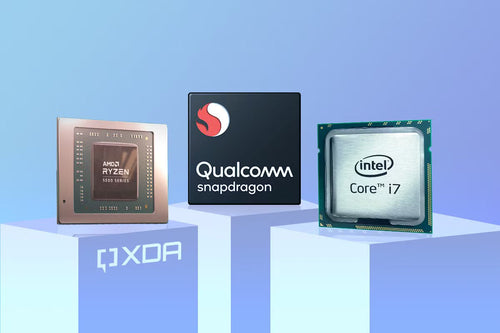
How Intel Is Fighting Back Against AMD and Qualcomm with US Manufacturing Push
How Intel Is Fighting Back Against AMD and Qualcomm with US Manufacturing Push How Intel Is Fighting to Stay on Top Amid Fierce Competition from AMD and Qualcomm Intel has been the undisputed leader in the processor chip market for decades. But recently, two big challengers — AMD and Qualcomm — have been aggressively gaining ground. To hold on to its crown, Intel is ramping up innovation, investing heavily in US manufacturing, and reshaping its strategy to meet this new competition head-on. The Competition Heat Is On AMD’s comeback has been impressive. Over the last few years, its Ryzen CPUs have attracted gamers, creators, and even data centers with higher core counts and better performance per dollar. AMD’s market share in desktop CPUs has risen from about 15% in 2019 to nearly 30% by 2024, eating into Intel’s dominance. Meanwhile, Qualcomm, long known for mobile chips powering billions of smartphones, is expanding aggressively into laptops and other devices with its Snapdragon processors. Qualcomm’s focus on 5G integration and power efficiency is a direct challenge to Intel in the mobile and ultra-portable PC space. Intel’s Bold Manufacturing Push in the US Intel announced a massive investment of over $20 billion to build new fabs in Ohio and other states. These plants will produce chips using Intel’s latest 4nm and 3nm process technologies, crucial to compete with rivals using TSMC or Samsung fabs. The goal is to increase US semiconductor production capacity by millions of wafers per year, strengthening supply chains and reducing dependency on overseas factories. This move is supported by the US government’s CHIPS Act, which offers incentives to encourage domestic chip manufacturing, aiming to boost national security and create thousands of new jobs. Advancing Chip Technology and Product Roadmap Intel isn’t just building factories — it’s also advancing its technology: Its new processor architectures, like Meteor Lake and Arrow Lake, will use a mix of high-performance and energy-efficient cores to deliver better performance while saving power. Intel plans to leverage its experience to become a foundry service provider, manufacturing chips for other companies — a strategy that could increase revenue beyond just selling Intel-branded CPUs. The company aims to launch chips with better graphics, AI capabilities, and enhanced connectivity to stay competitive. The Impact of Trade Tensions Intel’s efforts come during an uncertain global trade environment, especially between the US and China: The ongoing trade war and tariff hikes have increased costs and complicated supply chains for semiconductor companies. Export restrictions on technology to China, one of the biggest chip markets, could limit Intel’s growth potential there. These challenges partly explain Intel’s focus on building domestic manufacturing to ensure a stable supply chain amid geopolitical risks. What the Future Holds Intel’s aggressive investment in US fabs and next-generation chips shows it’s serious about reclaiming its leadership. By 2026, these new manufacturing plants are expected to be fully operational, producing millions of advanced chips each year. With AMD and Qualcomm continuously innovating, Intel’s journey won’t be easy — but with new factories, cutting-edge technology, and government backing, Intel is positioning itself for a strong comeback in the processor market.
AI Chip Market 2025: Snapdragon vs AMD vs Intel – Who’s Leading the AI Race?
AI Chip Race 2025: Snapdragon vs AMD vs Intel – Who’s Leading? Which Chipmaker Do OEMs Trust Most & What It Means for the Market Ahead The AI hardware race is heating up — and it’s not just about GPUs anymore. With the explosion of AI PCs, smartphones, and edge devices, major chipmakers like Qualcomm (Snapdragon), AMD, and Intel are in a fierce race to power the next wave of intelligent computing. But who’s really winning the AI race? And more importantly, which player are OEMs (like Lenovo, HP, Dell, and others) putting their trust in for the AI-powered future? 📊 The AI Chip Showdown: Qualcomm vs AMD vs Intel Brand Key Focus Area Notable AI Chips AI PC OEM Support (2024–2025) Market Strength Qualcomm Mobile + AI PCs Snapdragon X Elite, X Plus Lenovo, Microsoft, Samsung, HP Strong in mobile, growing in AI laptops AMD AI gaming + productivity PCs Ryzen 8040 “Hawk Point” Series Acer, ASUS, HP, Lenovo Balanced performance + integrated NPUs Intel All-in-one AI computing Intel Core Ultra (Meteor Lake) Dell, Lenovo, Acer, HP Massive OEM trust, but lagging NPU power 📈 AI PC Market Trend (2023–2026 Estimate) 🧠 Who’s Winning — And What’s Next? Qualcomm: Snapdragon is making the biggest leap in the AI chip race thanks to its powerful NPUs and growing OEM adoption. With 45 TOPS AI performance and strong Windows 11 synergy, it’s ahead in AI-first design. AMD: Strong in gaming and productivity, AMD provides a balanced AI approach but currently offers lower AI compute (16 TOPS). Needs next-gen upgrades to remain competitive. Intel: Still leads in OEM trust and production volume but must catch up on AI compute. Upcoming Lunar Lake (48+ TOPS) is critical for regaining the edge. 🔚 Final Verdict The AI chip race is reshaping the PC industry. Qualcomm may not have been a traditional PC player, but its Snapdragon X platform is winning trust — and OEMs are betting big. Intel and AMD won’t sit quietly though, with massive roadmaps in motion. By 2026, the definition of a high-performance PC will revolve around AI capabilities — not just raw speed.